st web — Localhost Web Workspace
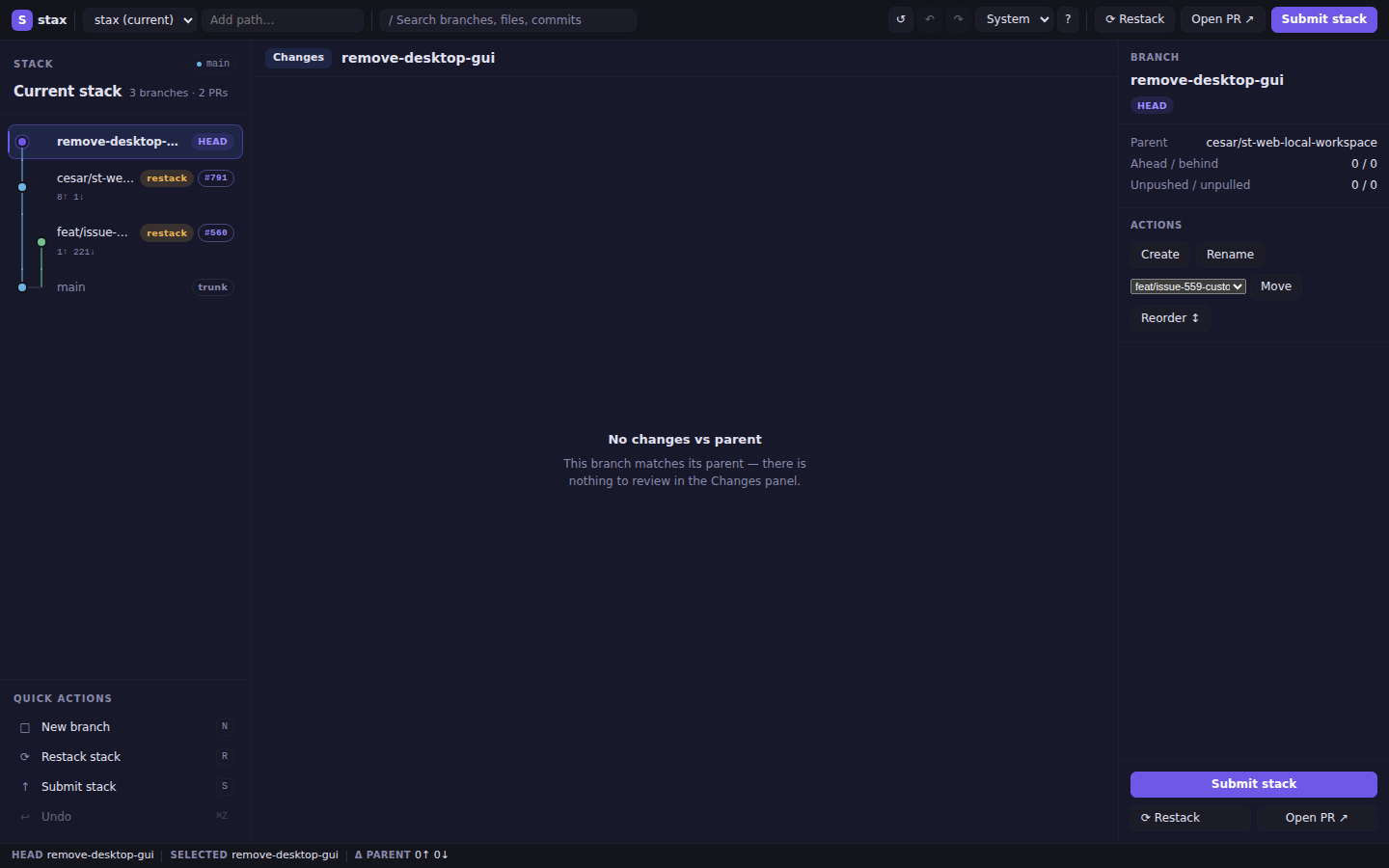
st web starts a fast, secure, browser-based workspace for stax on 127.0.0.1. The layout uses a three-column reference design: a connected stack rail on the left, a review workspace in the centre, and a branch inspector on the right — all powered by HTMX for partial-page updates without a JavaScript framework.
Quick start
st web            # opens port 8787, or warns and uses a free port if busy
st web --port 0   # ephemeral port (chosen by OS)
st web --no-open  # start without opening browser; prints URL
st web /path/inside/repo  # discover and open a specific worktree
The current directory or explicit [PATH] may be anywhere inside a Git worktree. Stax discovers the enclosing worktree root before starting the server.
Flags
| Flag | Default | Description |
|---|---|---|
[PATH] |
current directory | Repository or path inside one to open |
--port <N> |
8787 |
Port to bind. 0 picks an ephemeral port. If the port is busy, stax warns and uses a free OS-selected port. |
--no-open |
false | Skip opening the browser; just print the URL. |
Layout
┌─ Top bar: [S stax] repo ▾ │ / search ⌘K │ ↺ ↶ ↷ theme ? │ Restack  Open PR ↗  Submit stack ─┐
├─────────────────┬──────────────────────────────┬────────────────────────────────────────────┤
│ STACK      main │ feat/branch   2 commits …    │ BRANCH                                     │
│ Current stack   │ [Changes]                    │ feat/branch [HEAD] [clean]                 │
│ 3 branches·2PRs │ ─ Changed files ─────────── │                                            │
│ ● feat/branch   │  foo.rs  +12  │ 1  context  │ Parent   main                              │
│ ○ web-foundation│  bar.rs   +3  │ 2  context  │ A/B      2 / 0                             │
│ ● main          │               │ 3 -old line │ Remote   tracked                           │
│                 │               │ 3 +new line │                                            │
│ QUICK ACTIONS   │               │             │ FULL REQUEST                               │
│ □ New branch  N │               │             │ #742  ● passing                            │
│ ⟳ Restack    R  │               │             │ Draft  No                                  │
│ ↑ Submit     S  │               │             │                                            │
│ ↩ Undo      ⌘Z  │               │             │ COMMITS                                    │
│                 │               │             │ a1b2c3d  feat: add feature                 │
│                 │               │             │ ─────────────────────────────              │
│                 │               │             │      [     Submit stack     ]              │
│                 │               │             │      [ ⟳ Restack ] [Open PR ↗]            │
├─────────────────┴──────────────────────────────┴────────────────────────────────────────────┤
│ Status: HEAD main · Selected feat/branch · Δ parent 3↑ 0↓ · PR #42                        │
└─────────────────────────────────────────────────────────────────────────────────────────────┘
Press 1, 2, 3 to toggle each pane.
Panels
| Panel | Role |
|---|---|
| Stack rail | Connected branch cards with topology connectors, stack summary, and compact quick actions. Selecting a card does not check out — use the co button. |
| Review workspace | Selected branch header (branch name, file count, +/- totals) followed by a narrow changed-file navigator beside a large diff pane with old/new line numbers. Only the Changes view is rendered; Commits and Stack preview are intentionally omitted. |
| Branch inspector | Branch identity, divergence, remote state, pull-request details, and commit list with a dominant Submit stack CTA at the bottom. |
| Status bar | Current HEAD, selected branch, ahead/behind vs parent, restack/PR badges. Refreshes with the stack. |
Appearance
The top-bar System / Light / Dark control sets the workspace theme:
| Mode | Behaviour |
|---|---|
| System (default) | Follows the OS prefers-color-scheme setting |
| Light | Forces the light palette |
| Dark | Forces the dark palette (off-black surfaces, restrained violet accent) |
The preference is stored per repository in .git/stax/web-state.json.
Keyboard shortcuts
| Key | Action |
|---|---|
/ |
Focus the search box |
1 |
Toggle stack pane |
2 |
Toggle changes pane |
3 |
Toggle inspector pane |
N |
New branch (quick action; guarded outside inputs/overlays) |
R |
Restack stack (quick action) |
S |
Submit stack (quick action) |
Esc |
Dismiss overlay / blur search |
? |
Show keyboard-shortcut help |
Available operations (via top bar, branch cards, inspector, or quick actions)
- Checkout — click a branch card's
cobutton - Restack — restack the selected branch onto its parent
- Submit — push the stack and create/update PRs (draft mode)
- Undo / Redo — restore local transaction state (top-bar utility buttons)
- Refresh — reload the repository snapshot (top-bar
↺button) - Sync — after confirmation, fetch updates, fast-forward trunk, and delete merged local branches. It requires a clean worktree, never stashes, and does not restack. Refresh remains read-only.
- Rename — rename a branch (inspector Actions → Rename overlay)
- Create — create a new branch stacked on the selected one (inspector or quick action
N) - Delete — delete a non-current branch (inspector Actions)
- Move — reparent a branch subtree (inspector Actions → Move form)
Security model
- Binds 127.0.0.1 only — not accessible on the network.
- Every URL contains an unguessable 48-hex session token:
/s/<token>/…. - Every mutating POST requires a matching CSRF token (
csrfform field). Requests with wrong CSRF return403 Forbidden. Hostmust be127.0.0.1orlocalhost. An absentOriginis allowed for navigation and non-browser clients; when present, exactly oneOriginheader must equalhttp://127.0.0.1:<actual-bound-port>. Cross-site, malformed, duplicate, and wrong-port Origins return403 Forbidden.- Only one mutation at a time — mutating controls are disabled while an operation is in flight.
- The stack pane automatically fits branch names and topology. Drag its accessible divider or use Arrow keys to resize; the width is stored in browser localStorage per canonical repository. Double-click the divider to return to automatic sizing. Narrow layouts stack panes and wrap long names.
--hostflag is intentionally absent — you cannot expose this server to the network.
Routes reference
| Method | Path | Description |
|---|---|---|
GET |
/assets/app.css |
Embedded CSS (light, dark, and system themes) |
GET |
/assets/htmx.min.js |
Embedded htmx 2.x |
GET |
/assets/app.js |
Keyboard shortcuts, pane rehydration, file-nav interaction |
GET |
/s/:token/ |
Full workspace page |
GET |
/s/:token/stack?branch= |
Stack pane partial (+ status bar + topbar-actions OOB swaps) |
POST |
/s/:token/select |
Update selected branch |
GET |
/s/:token/details |
Inspector hydration |
GET |
/s/:token/diff |
Diff view (file navigator + diff pane with gutters, or empty state) |
GET |
/s/:token/ci |
CI summary |
POST |
/s/:token/search |
Filter branches |
POST |
/s/:token/panes |
Toggle pane visibility |
POST |
/s/:token/theme |
Set appearance (system / light / dark) |
POST |
/s/:token/refresh |
Reload snapshot |
POST |
/s/:token/op/checkout |
Check out a branch |
POST |
/s/:token/op/create |
Create a branch |
POST |
/s/:token/op/rename |
Rename a branch |
POST |
/s/:token/op/delete |
Delete a branch |
POST |
/s/:token/op/restack |
Restack |
POST |
/s/:token/op/sync |
Confirmed safe sync (clean worktree, no stash or restack) |
POST |
/s/:token/op/submit |
Submit (draft PRs) |
POST |
/s/:token/op/undo |
Undo last transaction |
POST |
/s/:token/op/redo |
Redo last transaction |
POST |
/s/:token/op/move |
Move branch subtree |
GET |
/s/:token/op/open-pr?branch= |
Redirect to PR URL |
Architecture
src/web/
  mod.rs          — entry point, run_server(), start_test_server()
  server.rs       — Axum server bind logic
  session.rs      — WebSession shared state (Arc<Mutex<…>>)
  routes.rs       — all Axum handlers; CSRF + host guards
  templates.rs    — maud HTML templates (workspace, diff, inspector)
  static_assets.rs — embedded CSS/JS via include_str!
  assets/
    htmx.min.js   — htmx 2.x (embedded at compile time)
All mutations run in tokio::task::spawn_blocking to avoid blocking the async runtime.