Interactive TUI
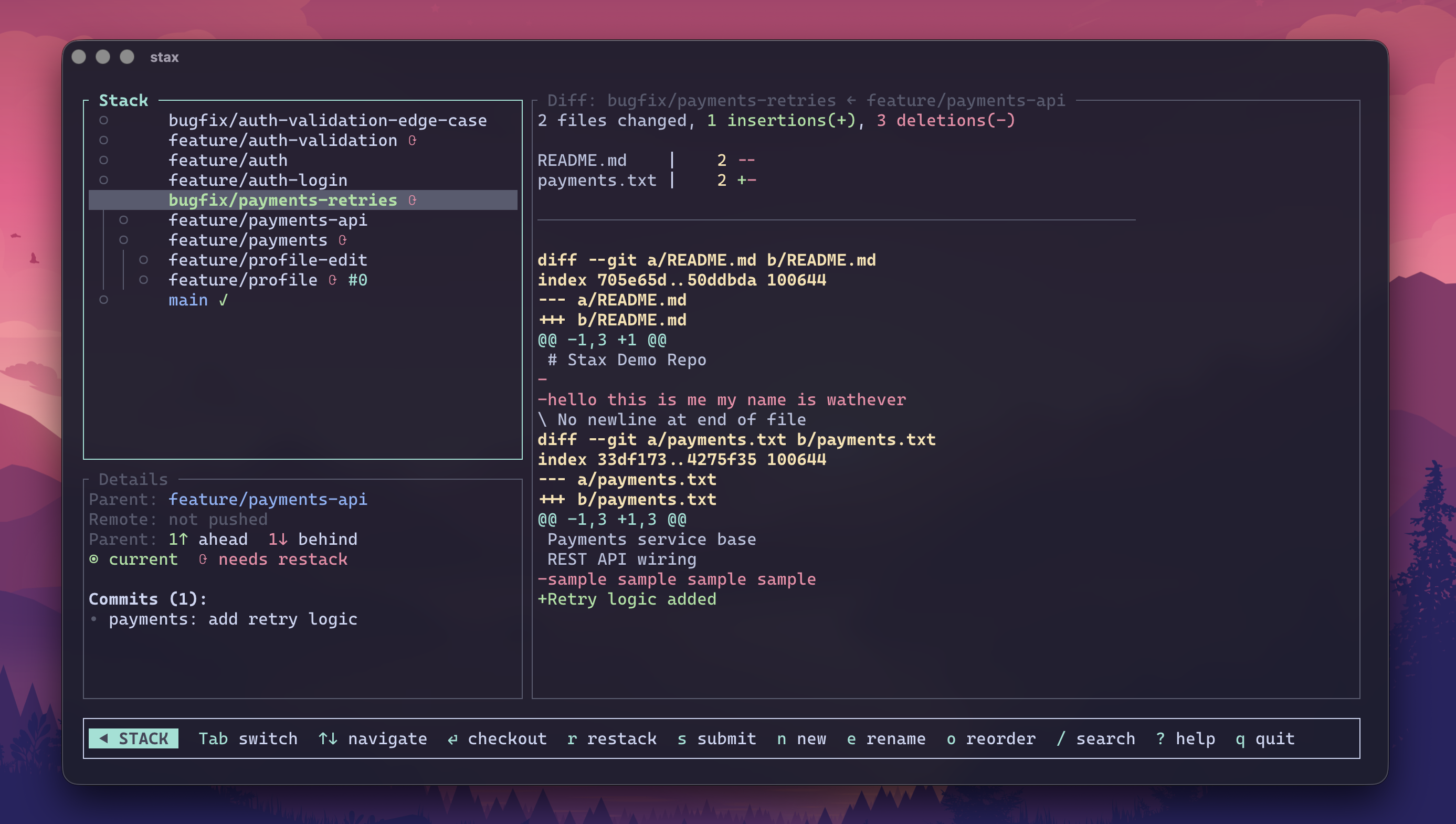
Run st with no arguments to open the stack dashboard.
stax
Features
- Full-height stack tree with PR status, sync indicators, and ahead/behind counts
- Selected-branch summary with recommended next actions and live CI progress
- Patch viewer with a compact diffstat header and scrollable body
- Runtime pane toggles for small terminals (
1Stack,2Summary,3Patch), remembered per repo - Keyboard-driven checkout, restack, submit, create, rename, delete
- Reorder mode for reparenting branches
The dashboard renders immediately from local stack data, then fetches live CI for the selected branch in the background. Diffs are loaded lazily and cached under the repo's common .git/stax directory, so reopening the TUI can show unchanged branch patches immediately. Pane visibility is also saved there, so 1/2/3 layouts stick across launches. While checks are running, the stack row shows a completed/total counter and the summary pane expands with pass/fail/running counts plus elapsed/ETA.
The main st TUI is focused on stacks and patches. Worktree management lives in the dedicated st wt dashboard.
Keybindings
| Key | Action |
|---|---|
j/k or ↑/↓ |
Navigate branches |
Enter |
Checkout branch |
r |
Restack selected branch |
R (Shift+r) |
Restack all branches in stack |
s |
Submit stack |
o |
Open selected branch PR in your browser |
O (Shift+o) |
Enter reorder mode |
n |
Create branch |
e |
Rename current branch |
d |
Delete branch |
/ |
Search / filter branches |
Tab |
Toggle focus between stack and patch panes |
1 / 2 / 3 |
Show/hide Stack, Summary, and Patch panes |
? |
Show keybindings |
q/Esc |
Quit |
Reorder mode
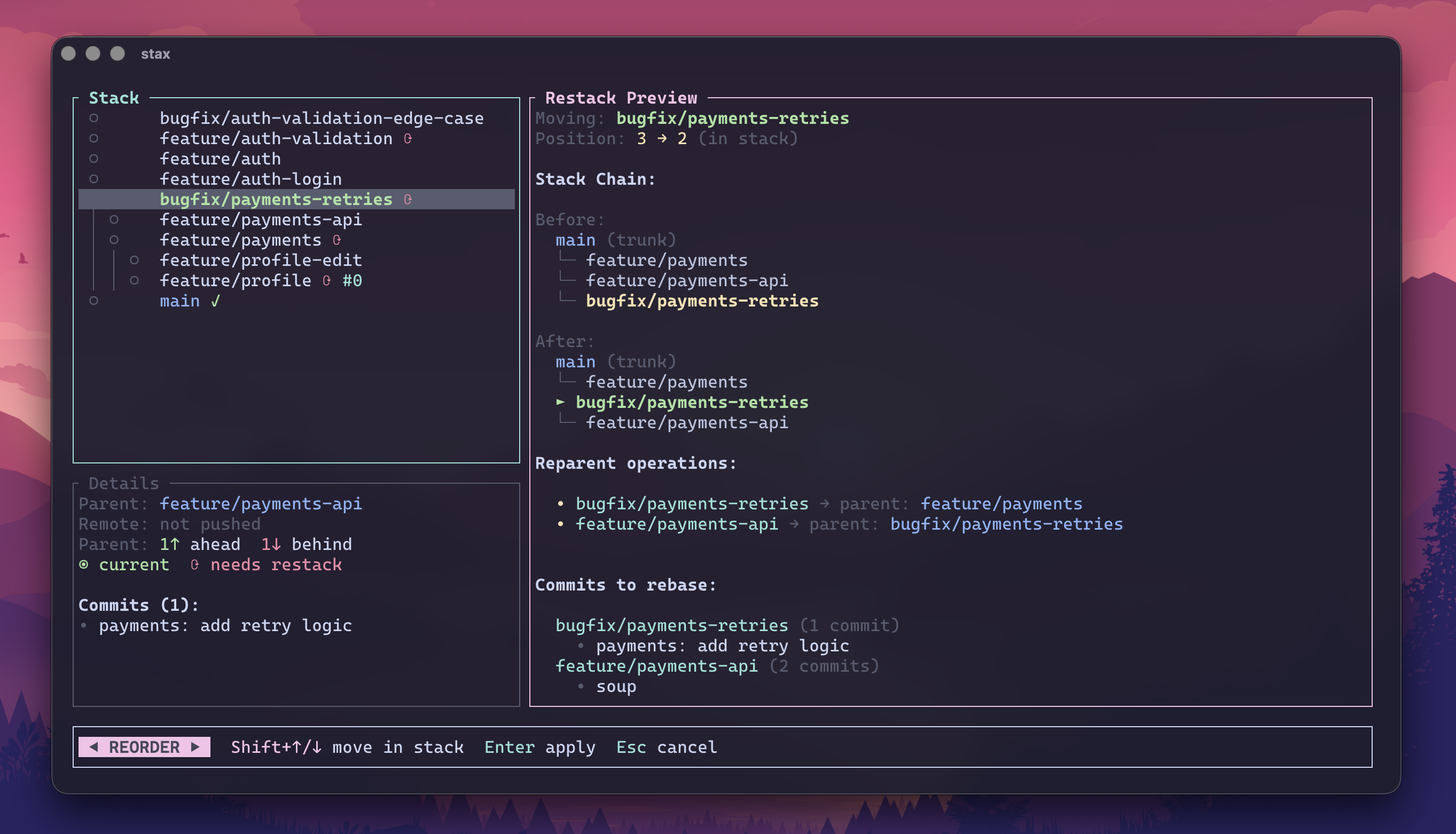
- Select a branch and press
o - Move with
Shift+↑/↓ - Review previewed reparent operations
- Press
Enterto apply and restack
Split mode
Split a branch with multiple commits into stacked branches.
st split
| Key | Action |
|---|---|
j/k or ↑/↓ |
Navigate commits |
s |
Add split point at cursor |
d |
Remove split point |
S-J/K |
Move split point down/up |
Enter |
Execute split |
? |
Toggle help |
q/Esc |
Cancel |
Splits are transactional and recoverable with st undo.
Hunk split mode
Split a single-commit branch by selecting individual diff hunks.
st split --hunk
Two-pane layout: file/hunk list on the left, diff preview on the right. Splitting happens in rounds — select hunks, name the new branch, repeat until all hunks are assigned.
List mode (default)
| Key | Action |
|---|---|
j/k or ↑/↓ |
Navigate files and hunks |
Space |
Toggle hunk selection |
a |
Toggle all hunks in current file |
u |
Undo last selection change |
Tab |
Switch to sequential mode |
Enter |
Finish round (proceed to naming) |
? |
Show help |
q/Esc |
Abort |
Sequential mode
Step through hunks one at a time with yes/no prompts. Press Tab to return to list mode.
| Key | Action |
|---|---|
y |
Accept hunk and advance |
n |
Skip hunk and advance |
a |
Toggle file and jump to next file |
u |
Undo |
Enter |
Finish round |
Flow
- Select hunks for the first new branch
- Press
Enter, confirm the branch name - Repeat for remaining hunks
- stax creates the branch chain and updates stack metadata after the last round
Default branch name suggestion: <original>_split_N for intermediate rounds, original name for the final round. Recoverable with st undo.